
Introduktion
This manual provides essential information for the safe and efficient use of your Samsung 43-Inch Class U8000H Series Crystal UHD 4K Smart TV. Please read all instructions carefully before using the product and retain this manual for future reference.
Vad finns i lådan
Kontrollera att alla komponenter finns i förpackningen:
- Samsung 43-Inch U8000H Series Crystal UHD 4K Smart TV
- Strömkabel
- Fjärrkontroll
- Stå
- Användarmanual (detta dokument)
- Garantikort

Image: Included components for the Samsung U8000H Series TV.
Inställning
1. Physical Setup (Stand or Wall Mount)
Before proceeding, ensure the TV is placed on a stable, level surface or securely mounted to a wall. Refer to the separate wall mount instructions if applicable.
- Fästa stativet: Carefully place the TV screen-down on a soft, clean cloth. Align the stand with the designated slots on the bottom of the TV. Secure the stand using the provided screws.
- Väggmontering: If wall mounting, ensure you use a VESA-compatible mount (200 x 200 mm) and follow the mount manufacturer's instructions. Disconnect the stand if already attached.
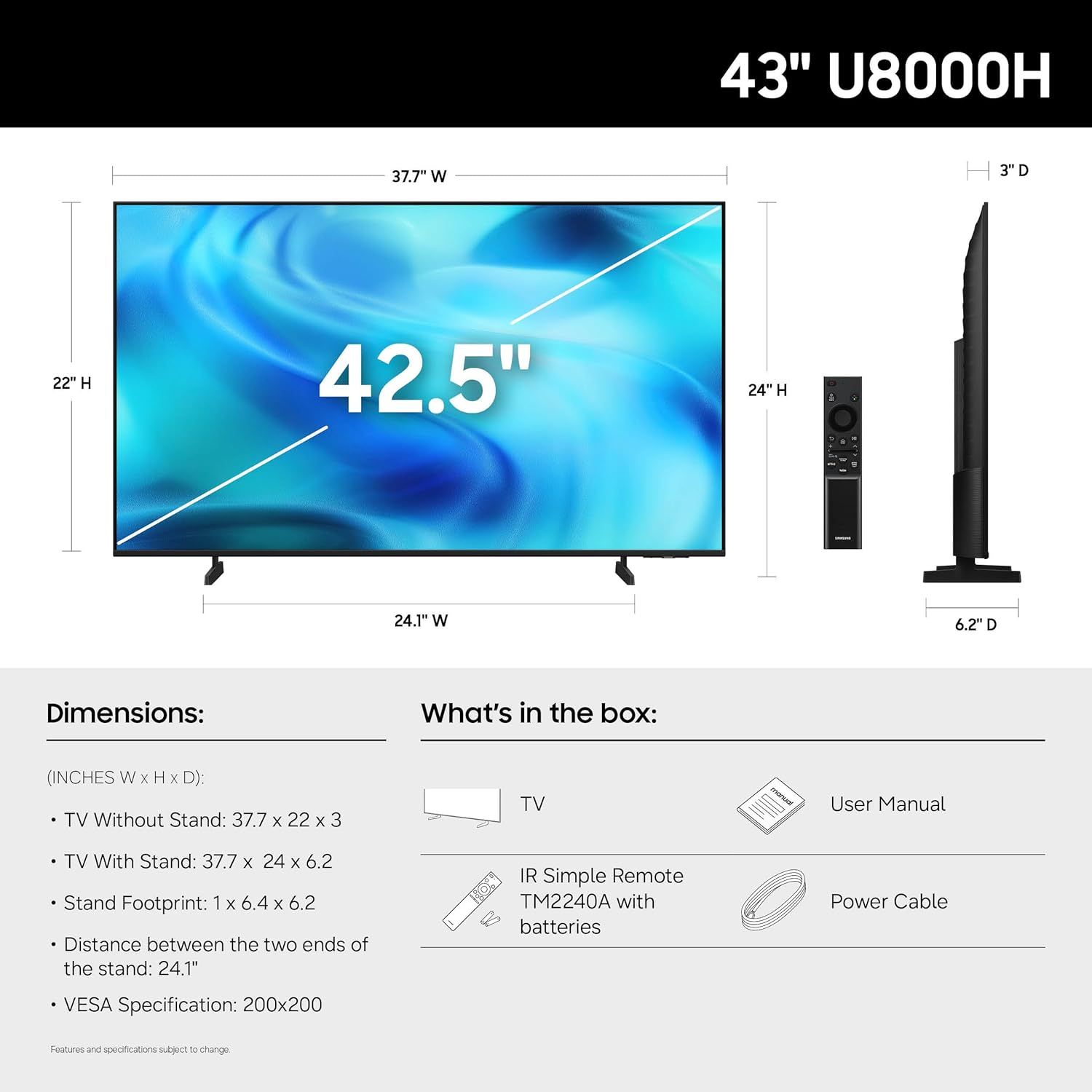
Bild: Baksida view of the TV, highlighting VESA mounting points and input panel.
2. Anslutande enheter
Connect your external devices (cable box, Blu-ray player, gaming console, etc.) to the TV's input ports.
- HDMI: Use HDMI cables for high-definition video and audio. The TV has 3 HDMI ports. HDMI 1 supports eARC for enhanced audio return.
- USB: Connect USB devices for media playback or power. The TV has 1 USB port.
- Ethernet (LAN): För en stabil trådbunden internetanslutning.
- Antenn/kabel: Connect an antenna or cable TV signal for over-the-air or cable channels.

Bild: Detaljerad view på TV:ns anslutningspanel.
3. Första start och nätverksinstallation
- Anslut strömkabeln till TV:n och sedan till ett vägguttag.
- Tryck på strömknappen på fjärrkontrollen eller TV:n.
- Följ instruktionerna på skärmen för att slutföra den första installationen, inklusive språkval, nätverksanslutning (Wi-Fi eller Ethernet) och kanalsökning.
- For smart features, you may be prompted to log in to or create a Samsung Account.
Användning av TV:n
Fjärrkontroll
Den medföljande fjärrkontrollen låter dig navigera i TV:ns gränssnitt, justera inställningar och komma åt smarta funktioner. Bekanta dig med knapplayouten för optimal användning.

Image: The standard remote control for the Samsung U8000H Series TV.
Nyckelfunktioner och funktioner
-
Kristallprocessor 4K: This powerful processor enhances colors and sharpens details, providing a vibrant 4K viewing experience. It also performs 4K upscaling for lower-resolution content.

Image: Visual representation of the Crystal Processor 4K technology.
-
Motion Xcelerator: Enjoy clear picture and smooth motion, especially in fast-paced scenes like sports and games. This technology estimates and adjusts frame transitions in real-time.

Image: Motion Xcelerator in action, demonstrating smooth visuals.
-
Färgförstärkare: This feature enhances color intensity, making reds fiery and blues sparkling, transforming content into a visually rich experience.

Image: Demonstrating the enhanced colors with Color Booster.
-
4K-uppskalning: Upgrade your favorite shows and movies to crisp 4K clarity. This advanced technology enhances details and clarity even from lower-quality sources.

Image: Illustration of 4K Upscaling improving image detail.
-
Oändligt gratis innehåll (Samsung TV Plus): Access over 2,700 free streaming options, including 750+ subscription-free channels. Content includes news, sports, movies, and more.

Image: Samsung TV Plus interface with free streaming options.
-
Samsung Gaming Hub: Play thousands of video games without a console. This central hub brings together games from consoles, cloud services, and gaming apps.

Image: Samsung Gaming Hub interface.
-
Vision AI Companion: Ask your TV questions and access powerful AI features. Get personalized answers with Bixby, and utilize AI agents like Microsoft Copilot for enhanced viewing.

Image: Vision AI Companion features.
-
One UI Tizen: The TV's operating system provides an intuitive smart TV platform tailored to you, with personal data secured by Samsung Knox. It also receives 7 years of automatic OS updates.

Image: One UI Tizen smart TV interface.
-
Samsung Knox-säkerhet: Enjoy peace of mind with built-in triple-layer data protection. Your TV experiences are secured against harmful apps and phishing sites.

Image: Samsung Knox Security features.
Underhåll
- Rengöring av skärmen: Torka försiktigt av skärmen med en mjuk, torr mikrofiberduk. För envisa märken, torka försiktigtampRengör trasan med vatten eller ett specialiserat skärmrengöringsmedel. Undvik starka kemikalier eller slipande material.
- Rengöring av ramen: Använd en mjuk, torr trasa för att rengöra TV-ramen och stativet.
- Ventilation: Se till att ventilationen runt TV:n är tillräcklig för att förhindra överhettning. Blockera inte ventilationsöppningarna.
- Nätsladd: Kontrollera regelbundet nätsladden för eventuella skador. Om den är skadad, byt omedelbart ut den mot en auktoriserad Samsung-reservdel.
Felsökning
| Problem | Möjlig lösning |
|---|---|
| Ingen kraft |
|
| Ingen bild / Förvrängd bild |
|
| Inget ljud / Lågt ljud |
|
| Fjärrkontrollen fungerar inte |
|
| Smarta funktioner fungerar inte / nätverksproblem |
|
Specifikationer
| Särdrag | Detalj |
|---|---|
| Modellnamn | U8000H |
| Modellnummer | UN43U8000HFXZA |
| Skärmstorlek | 43 tum |
| Displayteknik | LED |
| Upplösning | 4K UHD (3840 2160 x XNUMX XNUMX) |
| Uppdateringshastighet | 60 Hz |
| Processor | Kristallprocessor 4K |
| HDR-format stöds | HDR10+ |
| Anslutningsmöjligheter | 3x HDMI, 1x USB, Ethernet (LAN), Wi-Fi, Bluetooth 5.3 |
| Operativsystem | Tizen |
| Kontrollmetod | App, fjärrkontroll, röst |
| Ljudutgång | Inbyggd högtalare |
| VESA-monteringsstandard | 200 x 200 mm |
| Produktmått (D x B x H) | 6.2 cm D x 37.7 cm B x 24 cm H (med stativ) |
| Objektets vikt | 14.8 kg (med stativ) |
| Färg | Svart |

Image: Dimensional diagram of the Samsung 43-inch U8000H TV.
Garanti och support
Your Samsung 43-Inch U8000H Series Crystal UHD 4K Smart TV comes with a 1 års tillverkargaranti. For warranty claims, technical support, or service inquiries, please contact Samsung Customer Service.
You can find additional support resources, FAQs, and contact information on the official Samsung support webplats.
Online support: www.samsung.com/us/support/