1. Introduktion
This manual provides instructions for the safe and effective use of your Disney Frozen Bluetooth Speaker. This portable wireless speaker allows you to stream audio from Bluetooth-enabled devices or connect via a 3.5mm audio cable. It features a built-in microphone for speakerphone functionality and a rechargeable battery for portability.
2. Paketets innehåll
Se till att alla artiklar finns i paketet:
- Disney Frozen Bluetooth Speaker
- USB-laddningskabel
- 3.5 mm ljudkabel
3. Produktfunktioner
- Wireless audio streaming via Bluetooth
- Wired audio connection via 3.5mm headphone port
- Integrated microphone for speakerphone calls
- Inbyggt uppladdningsbart batteri
- USB chargeable
4. Kontroller och portar

Bild 1: Främre view of the speaker with control buttons on the top panel.
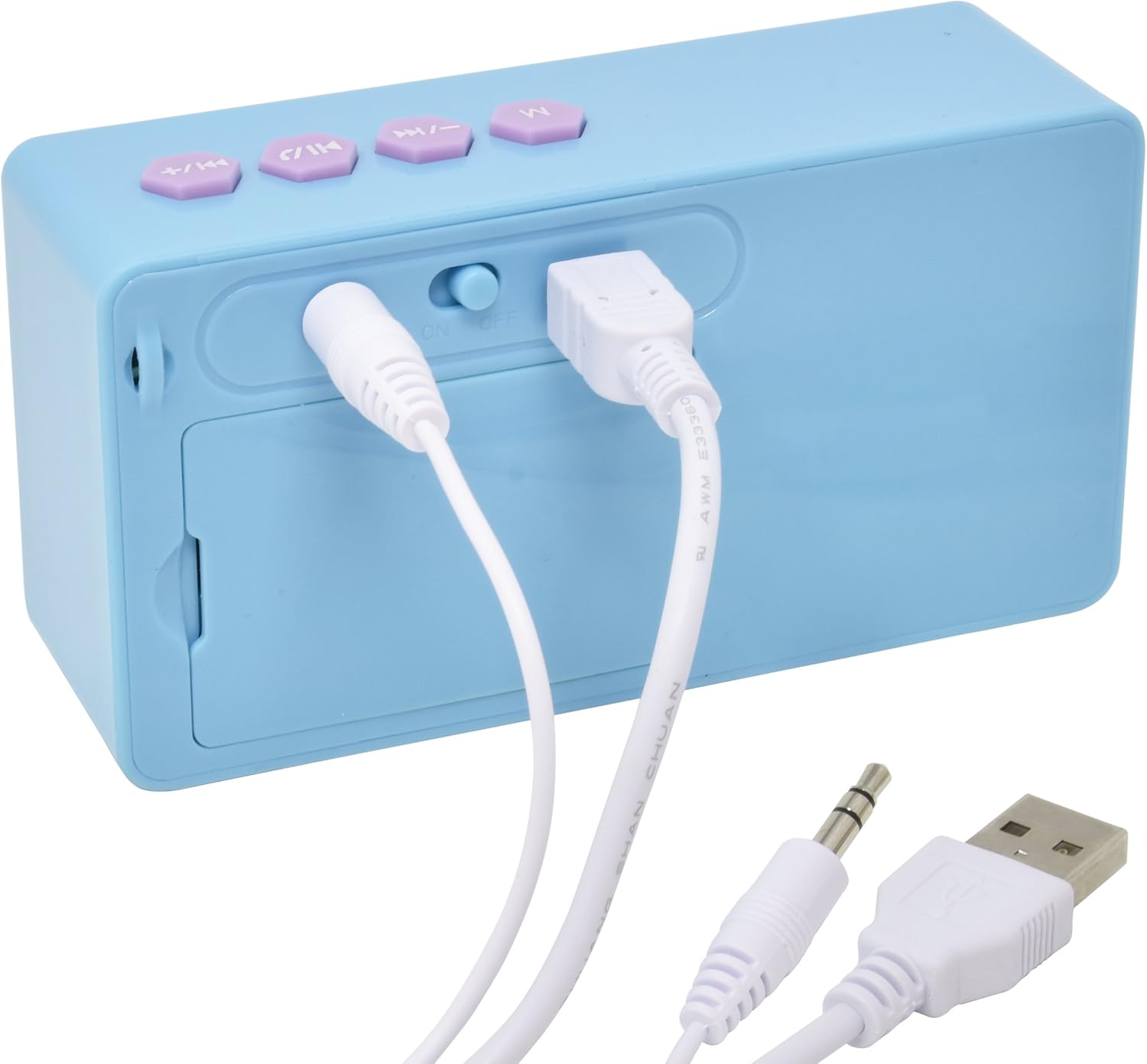
Bild 2: Bak view of the speaker showing the power switch and connection ports.
Kontroller på övre panelen:
- M-knapp: Mode selection (Bluetooth/AUX).
- Föregående spår / Volym ned-knapp: Press once for previous track, press and hold to decrease volume.
- Spela/Pausa/Ring-knapp: Press once to play/pause music, press to answer/end calls.
- Nästa spår / Volym upp-knapp: Press once for next track, press and hold to increase volume.
Portar på bakpanelen:
- På / Av knapp: Slår på eller av högtalaren.
- USB laddningsport: Connect the USB cable for charging.
- 3.5 mm AUX-ingång: Connect the 3.5mm audio cable for wired playback.
5. Ladda högtalaren
Before first use, fully charge the speaker. The speaker charges quickly when connected to a USB port.
- Locate the USB Charging Port on the rear of the speaker (refer to Image 2).
- Connect the small end of the included USB charging cable to the speaker's USB port.
- Anslut den större änden av USB-laddningskabeln till en strömförsörjd USB-port (t.ex. dator, USB-väggadapter).
- The charging indicator light will illuminate. Once charging is complete, the light may change color or turn off.
Notera: Do not use damaged cables or chargers. Ensure the charging port is dry before connecting the cable.
6. Bluetooth-anslutning
To connect your speaker wirelessly to a Bluetooth-enabled device:
- Se till att högtalaren är laddad.
- Skjut på ON/OFF-brytare on the rear of the speaker to the 'ON' position. The speaker will power on and enter Bluetooth pairing mode, indicated by a flashing LED light and an audible prompt.
- Gå till Bluetooth-inställningsmenyn på din Bluetooth-aktiverade enhet (smartphone, surfplatta, dator).
- Leta efter available devices. The speaker will appear as "Disney Frozen Speaker" or a similar name.
- Select the speaker from the list to pair. Once successfully paired, the LED indicator will stop flashing, and you will hear a confirmation tone.
- Du kan nu spela upp ljud från din enhet via högtalaren.
Notera: If prompted for a password, enter "0000". The speaker will automatically attempt to reconnect to the last paired device when powered on.
7. Trådbunden anslutning (AUX)
To connect your speaker using the 3.5mm audio cable:
- Se till att högtalaren är påslagen.
- Connect one end of the included 3.5mm audio cable to the 3.5 mm AUX-ingång port on the rear of the speaker (refer to Image 2).
- Connect the other end of the 3.5mm audio cable to the headphone jack or AUX output of your audio device.
- Tryck på M-knapp on the top panel to switch to AUX mode if the speaker does not automatically detect the wired connection.
- Spela upp ljud från din enhet.
Notera: When using the AUX connection, playback controls (play/pause, track skip) on the speaker may not function, and you will need to control playback directly from your connected device.
8. Using as a Speakerphone
When connected via Bluetooth to a smartphone, the speaker can be used to handle phone calls.
- Besvara ett samtal: När ett samtal kommer in, tryck på Play/Pause / Call Button en gång för att svara.
- Avsluta ett samtal: Tryck på under ett samtal Play/Pause / Call Button en gång för att avsluta samtalet.
- Avvisa ett samtal: Tryck och håll ned Play/Pause / Call Button i cirka 2 sekunder för att avvisa ett inkommande samtal.
Audio will be routed through the speaker, and the built-in microphone will capture your voice.
9. Underhåll
- Rengör högtalaren med en mjuk, torr trasa. Använd inte slipande rengöringsmedel eller lösningsmedel.
- Håll högtalaren borta från vatten, fukt och extrema temperaturer.
- Försök inte att ta isär eller reparera högtalaren själv. Detta upphäver garantin.
- Förvara högtalaren på en sval och torr plats när den inte används under längre perioder.
10. Felsökning
| Problem | Möjlig lösning |
|---|---|
| Högtalaren slås inte på. | Ensure the speaker is charged. Connect to a power source using the USB cable. Check the ON/OFF switch. |
| Kan inte para ihop via Bluetooth. | Ensure the speaker is in pairing mode (flashing LED). Make sure Bluetooth is enabled on your device. Move the speaker closer to your device. Forget the device from your Bluetooth list and try pairing again. |
| Inget ljud eller låg volym. | Increase the volume on both the speaker and your connected device. Ensure the correct input mode (Bluetooth or AUX) is selected. Check if the audio cable is fully inserted for wired connections. |
| Bluetooth-anslutningen bryts ofta. | Ensure there are no obstructions between the speaker and your device. Move closer to the speaker. Avoid interference from other wireless devices. |
| Mikrofonen fungerar inte under samtal. | Ensure the speaker is connected via Bluetooth and not AUX. Check your phone's audio output settings during a call to ensure it's routed to the Bluetooth speaker. |
11. Specifikationer
| Särdrag | Detalj |
|---|---|
| Modellnummer | 057-00-3417 |
| Anslutningsteknik | Bluetooth, USB (för laddning) |
| Specialfunktion | Portable, Built-in Microphone |
| Strömkälla | Batteridriven (uppladdningsbar) |
| Högtalare maximal uteffekt | 3 Watt |
| Produktens mått | 6.2 x 6.1 x 2.3 tum |
| Objektets vikt | 9.1 uns |
| UPC | 092298925264 |
12. Garantiinformation
Denna produkt omfattas av en 1 YEAR FACTORY WARRANTY. Please retain your proof of purchase for warranty claims. For support or warranty inquiries, please refer to the contact information provided with your purchase documentation.


